Fake betting apk files circulate in cricket and colour-prediction chat groups almost every week, usually as a short download link with a promise attached. The installer looks exactly like the app it imitates, but the code inside can be something else entirely. This page covers what to inspect before tapping install, and what to do if a bad file is already sitting on a phone.
Why Fake Betting APK Files Spread So Easily
Android allows software to be installed from outside the Play Store, a process usually called sideloading. That openness is genuinely useful, and it is also the single reason this kind of scam works at all. An .apk is only an installer package: nothing about the icon, the app name or the splash screen is checked by anyone before the code inside it runs on a device.
The reuse of betting and gaming branding is behavioural rather than technical. People looking for these apps are often already used to downloading installers straight from websites and forwarded chat messages, so a convincing copy only has to be shared widely enough to reach somebody in a hurry. No clever exploit is involved; the install is approved by hand, by the person who was tricked.
The realistic danger is not a crash or a blank screen. It is a quiet background component that reads incoming messages, captures notifications belonging to other apps, or draws a fake login layer on top of a real one. That is the mechanism by which one-time passwords and payment confirmations get intercepted while the visible app carries on behaving normally.
- Credential theft – a cloned login form sends a username and password to a server nobody recognises.
- OTP interception – SMS or notification access lets a hidden component read codes before the owner sees them.
- Screen overlay – a transparent layer captures taps meant for a genuine banking or payment app.
- Contact harvesting – an address book is uploaded and reused to push the same file to people who trust the sender.
- Persistence – device administrator rights make the app awkward or impossible to remove through normal settings.
Worth saying plainly once: betting and prediction outcomes are chance events with a built-in house edge, real money is genuinely at risk, and these products are for adults aged 18 and over. A malicious installer simply adds a second, separate route to losing money – one that has nothing to do with the result of any match.
Eight Checks Before You Tap Install
Treat every installer as unverified until it passes a short sequence. Most people run none of these checks, and running even half of them filters out the obvious copies. The eight below are ordered roughly by how quickly each one can be completed, so the cheap tests come first.
- Where the file came from. A file forwarded by a friend, a group admin or a self-described support agent carries no provenance whatsoever. Only a download served from an address typed into the browser by hand is worth any further consideration.
- The domain, read letter by letter. Lookalike spellings are the oldest trick on the list: a swapped letter, an inserted hyphen, a doubled consonant, or a familiar brand name sitting in front of an unfamiliar ending such as .click or .top.
- File name and size. Compare both against what the site itself states. A full gaming app that downloads in three megabytes is usually a wrapper that fetches the real payload afterwards, which is a known dropper pattern.
- Package name. After installation, Settings then Apps shows the package identifier, such as com.example.app. Two files can share a name and an icon while using completely different package IDs, certificates, permissions and owners.
- Signing certificate. Every Android app is signed with its developer’s private key, and a clone rebuilt from copied code cannot reproduce that key. Compare the fingerprint against whatever the operator publishes; if nothing is published anywhere, that silence is itself the answer.
- Version and update history. A fresh file with no release notes, or a version number lower than the one documented on the website, points to a repackaged older build rather than a current release.
- The permission list at install time. Read the prompts instead of tapping through them. The table in the next section covers which requests have no honest explanation inside a betting or prediction app.
- Scan before opening it. Submit the file to a reputable multi-engine scanner, or scan it with an on-device security app that supports APK inspection. One credible detection is enough to stop.
Telling a Fake Installer from the Real One
No single check is conclusive on its own, and even a clean scan proves only that no engine recognises the file yet. The useful rule is cumulative: a file that fails two or more of the eight should be deleted rather than investigated further. Nothing is lost by walking away from a download, which is what makes this the cheapest decision on the page.
The checks above look at the file. The separate question of whether the platform behind it is what it claims to be needs different signals, and our notes on telling a real app from a fake one cover the operator side – contact details, withdrawal behaviour and support channels. Running both sets together is how people usually spot fake betting apk files before any damage is done.
Permissions a Betting App Should Never Ask For
Permissions are where intent becomes visible. A betting or prediction app plausibly needs network access, some storage for cached images, and occasionally a camera for document upload during account verification. Almost everything beyond that short list deserves a hard question before anything is granted.
| Permission requested | Honest use in a betting app | Why it is a red flag |
|---|---|---|
| Read / receive SMS | None | Lets OTPs and bank alerts be read silently |
| Contacts | None | Address book uploaded and reused to spread the file |
| Accessibility service | None | Can read screen content and tap buttons on your behalf |
| Notification access | None | Reads payment and OTP alerts from other apps |
| Device administrator | None | Resists removal; can lock or wipe the device |
| Install unknown apps | None | Allows further payloads to be added later |
| Draw over other apps | Rarely, for in-app popups | Enables fake overlays above banking screens |
| Camera | Document upload only | Background capture if never prompted in context |
Play Protect, the scanner built into Android, examines apps installed from outside the store as well as those from it, and will warn about or block files it recognises as harmful. Treat that as a safety net rather than a verdict. It cannot recognise a brand-new build that nobody has reported yet, and a warning tapped away is a warning wasted.
If a prompt appears saying something like “enable accessibility to continue” or “allow notification access for faster withdrawal”, stop there. No honest withdrawal process requires those permissions. That request is usually the entire purpose of the app, and everything shown before it was scenery built to get to this screen.
How Scammers Clone Real Betting Apps
Cloning an Android app is cheap and largely mechanical, which is why it happens at volume rather than as a targeted attack. The interface on screen is often the genuine one, lifted wholesale, with one small addition that is never visible to the person using it.
- Take the genuine installer and decompile it, leaving the interface and navigation untouched.
- Inject a compact module that handles data collection and sends it to a server the attacker controls.
- Re-sign the package with the attacker’s own key, because the original developer’s key is not available – which is exactly why signature comparison works as a test.
- Host the result on a lookalike domain with copied logos, screenshots and testimonial text scraped from the real site.
- Seed the link into chat groups, short-video captions and comment sections, often alongside a referral or gift-code hook.
Because the visible app is the original, it behaves normally. Screens load, menus work, and nothing looks wrong for days. This is precisely why visual inspection alone never identifies fake betting apk files – the look and feel was never the part that was modified in the first place.
A second pattern skips cloning altogether: an app that was never real at any point, promoted with bonus and gift-code messaging and a referral tree behind it. The mechanics closely mirror the recruitment patterns described in our notes on colour-prediction game scams – manufactured urgency, rewards for bringing friends, and a withdrawal that stalls behind one more fee. Nobody should be called a fraudster on suspicion alone, but those structural signs are worth recognising on sight.
Why an App Is Only Available Outside the Play Store
Google Play’s own catalogue rules limit which real-money gaming apps can be listed at all, which is why many are handed out as direct downloads instead. The absence of a Play Store listing is therefore not by itself evidence of dishonesty. What it does remove is an entire layer of automated review, publisher verification and user feedback that most people lean on without ever thinking about it.
That missing layer changes the risk picture in four concrete ways.
- There is no verified publisher identity to compare the file against.
- There are no ratings or review histories in which a sudden clone would stand out.
- Updates arrive as loose files rather than through one controlled channel – and an update is the easiest moment to slip in a swapped build.
- Removal, disputes and refunds sit entirely with the operator, with no store-level process behind them.
The practical consequence is that the burden of verification moves onto the person installing. When a store is doing the checking, carelessness is usually survivable. With a direct download, the only checks performed are the ones performed by hand, which is why the eight-step sequence above matters more here than anywhere else on a phone.
One more detail is easy to miss. Many devices require an “install unknown apps” setting to be switched on for a specific browser or messaging app before any installer will run. That setting usually stays enabled afterwards, quietly, for months. Turning it back off immediately removes a standing door that nothing else on the phone needs open.
APK Links Sent on WhatsApp and Telegram
The short answer is no, and it does not depend on who sent it. An installer that arrives inside a chat is a file of unknown origin by definition, because nothing in a forwarding chain preserves where the file actually started or what was done to it along the way.
Is It Safe to Install a File Sent in a Chat?
A friend forwarding an installer is not vouching for it; they are repeating something they also received. Group admins describing a channel as official rarely control the file being distributed in it. And the “mirror link” offered when a site appears to be down is the single most reliable moment for a substituted build to reach a large number of people at once.
The pretexts are fairly standardised, which makes them easy to recognise once they have been written down in one place:
- “Official APK – the Play Store version was removed.”
- “New mirror link, the old app has stopped working.”
- “Update required before your withdrawal can be processed.”
- “Install through my link and claim the code.”
- “Support file – install this so we can verify your account.”
In practice, most people who end up with fake betting apk files on a device received them this way rather than from a search engine. The delivery is social, not technical, which is why phone settings alone never solve it.
A workable standing rule: delete the forwarded file, open a browser, type the operator’s address by hand, and download from there if continuing at all. Keep the account side tight in parallel – our notes on account security hygiene for online cricket IDs cover password separation, login alerts and why support staff never need an OTP.
What to Do After Installing a Fake App
If something is already installed and now in doubt, the order of operations matters. Cut off communication first, strip privileges second, then deal with accounts and money. Working out of order gives a background component time to act while the cleanup is under way.
- Switch on airplane mode or disable mobile data and Wi-Fi, which stops anything being sent out during the cleanup.
- Open Settings, then Security, and revoke device administrator rights from the app – otherwise the uninstall option stays greyed out.
- Withdraw accessibility access and notification access from the same app in their respective settings menus.
- Uninstall it. If it still resists, restart the phone in safe mode, which loads it without third-party apps, and remove it from there.
- Run a full scan with Play Protect and with an on-device security app, then look for any second app nobody remembers installing.
- Using a different device, change the email password first, then passwords for any banking, wallet or gaming account that was open on the phone. Change the UPI PIN too.
- Review recent statements on every linked bank account and wallet, looking specifically for unfamiliar autopay or e-mandate authorisations.
- If any money has moved, report it immediately rather than waiting to understand what happened.
- If removal keeps failing, factory reset the device and avoid restoring an app backup made after the installer appeared.
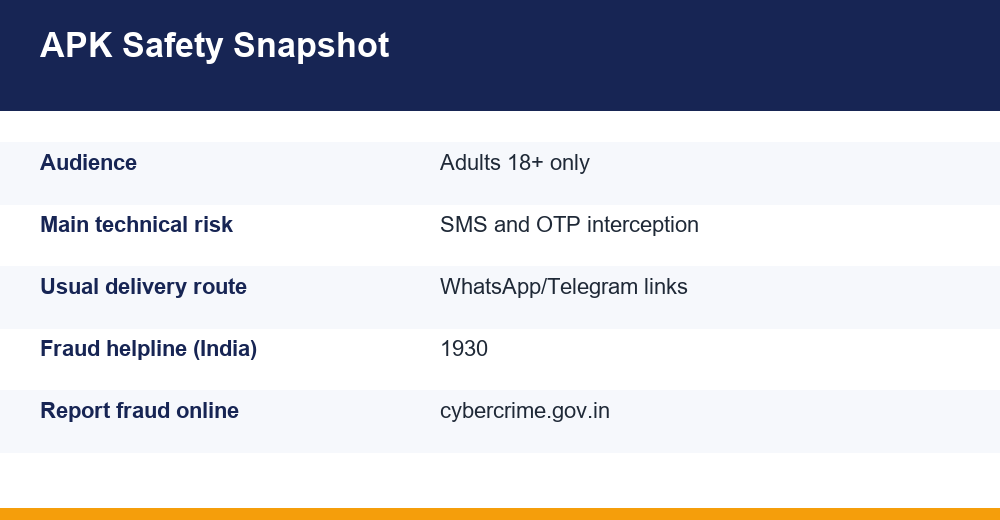
Speed matters most on the money side. In India, suspected financial cyber fraud is reported on the 1930 helpline, which operates around the clock, with a detailed complaint filed afterwards on the National Cyber Crime Reporting Portal at cybercrime.gov.in. Keep the bank or wallet name, the transaction ID or UTR number, the date and the amount to hand before calling.
Write down what happened while it is fresh: the link, the sender, the file name, timestamps and any screenshots already saved. Reconstructing that sequence a week later is considerably harder than recording it the same day, and the details are exactly what a bank or helpline will ask for first.
Protecting Your Account and Your Money
Most of the protection available here is habit rather than software. A short standing routine costs nothing and removes the conditions these installers depend on.
- Install only from an address typed by hand, and bookmark it so searching is never necessary again.
- Keep Play Protect enabled, and switch “install unknown apps” back off as soon as it is no longer needed.
- Never grant SMS, contacts, accessibility or notification access to a gaming or prediction app, whatever reason is offered.
- Keep the email password unique and protected with two-factor authentication, since email is the reset path for everything else.
- Set deposit and session limits beforehand rather than during, and keep any gaming funds separate from the account holding savings.
- Decline every unsolicited “update” and “support file”, and verify anything unexpected on the operator’s own site.
Two reminders belong alongside the technical ones. Outcomes in these products are determined by chance and carry a built-in house edge, so money placed is money genuinely at risk, and no file, app or method changes that arithmetic. And if play has stopped feeling like a choice, free support exists: in India, Tele-MANAS offers 24/7 counselling in multiple languages on 14416 or 1800-891-4416.
Fake betting apk files succeed on hurry – a link, a countdown, a bonus apparently expiring, a withdrawal seemingly one tap away. None of the checks on this page takes more than a few minutes, and the files that fail them were never going to be worth the install.
Frequently Asked Questions
How can I tell if an APK file is fake?
Check the source first, because only a download from an address typed by hand has real provenance. Then compare the file name and size against the site, inspect the package identifier and signing certificate rather than the icon, read every permission prompt, and scan the file before opening it. Fake betting apk files usually fail two or more of those checks.
What permissions should a betting app never ask for?
SMS reading, contacts, accessibility services, notification access and device administrator rights have no honest function in a betting or prediction app. Those are exactly the permissions fraud malware uses to intercept one-time passwords, read alerts from banking apps and resist removal. Network access, cached storage and a camera for document upload are the reasonable ones.
How do scammers clone real betting apps?
They decompile a genuine installer, leave the interface untouched, inject a small data-collection module, then re-sign the package with their own key because the original developer’s key is unavailable. The result is hosted on a lookalike domain with copied branding and pushed through chat groups. The app behaves normally, which is why signature checks matter.
Is it safe to install an APK sent on WhatsApp or Telegram?
No. A forwarded installer has no verifiable origin, and whoever sent it is usually repeating something they also received rather than vouching for it. Mirror links offered when a site appears to be down are a particularly common substitution point. Delete the file, open a browser, type the operator’s address by hand and download from there.